Blazorade Scraibe: Making Blazor Content Discoverable
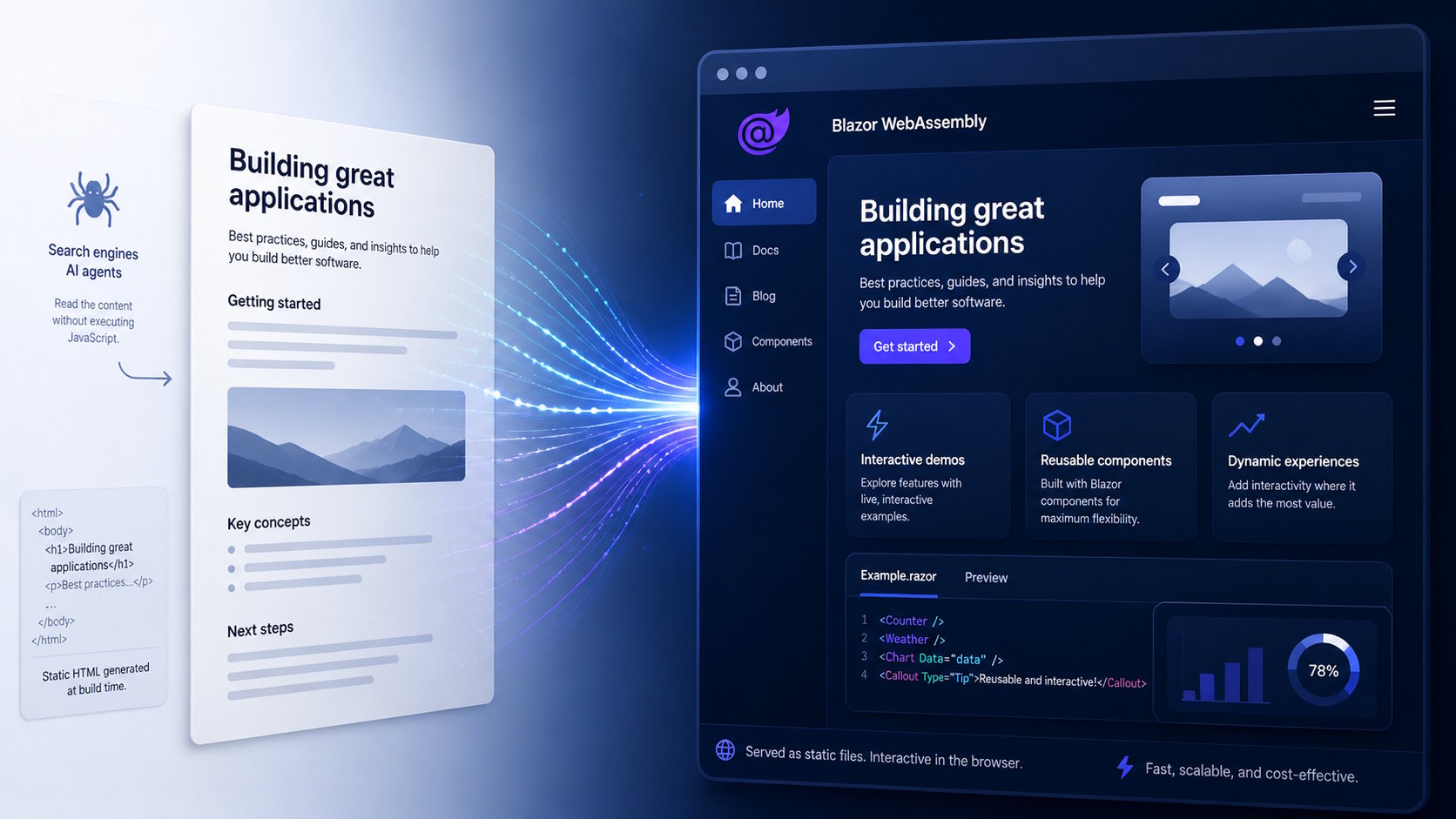
If you’ve ever built a Blazor WebAssembly application with real content, you may have run into a frustrating problem. Everything works in the browser, but search engines and AI tools struggle to see your content.
The reason is simple. Your content does not exist until the application runs in the browser.
This is not specific to Blazor. The same issue affects all Single Page Application (SPA) frameworks, including React, Angular, and Vue. The initial HTTP response only returns bootstrap logic, and JavaScript renders the actual content later. Many bots and AI agents never execute that step. They fetch the HTML, see an empty shell, and move on.
At the same time, something else has changed. With tools like GitHub Copilot, you are no longer building alone. You can treat Copilot as a relentless site builder that helps you write content, structure pages, and build components as you go.
Blazorade Scraibe is built around that idea. It combines static content generation with a set of conventions and guidance that work well with Copilot, so you can generate content, structure your site, and build interactive components with its help.
Blazorade Scraibe is an ongoing project. Features evolve based on real-world use, community contributions, and my own work on improving the project.
The Problem With SPA Applications and Content Visibility
How SPA Applications Work
Blazor WebAssembly, React, Angular, and other SPA frameworks all follow the same basic model. When a browser requests a page, the server returns a minimal HTML document along with JavaScript that bootstraps the application. The application then runs in the browser and renders the actual content.
This approach works well for users. It gives you fast navigation, rich interactivity, and a smooth experience overall. But it also shifts where the content exists. Instead of being part of the initial response, the content only appears after the application has started running in the browser.
What Bots and AI Agents Actually See
This difference becomes obvious when something other than a browser accesses your site. When a bot sends an HTTP request, it typically only reads the initial HTML response and does not execute any JavaScript.
In that situation, the bot never sees the rendered content. It only sees the application shell. From its point of view, the page is mostly empty, even though a real user would see a fully rendered view a moment later.
You can test this yourself. Try loading any page from your SPA application using tools like Postman or Bruno and look at the response. It will not match what you see in the browser. Then try the same with the Blazorade Scraibe documentation site. That site runs as a Blazor WebAssembly application on Azure Static Web Apps, even on the free tier, but still returns fully readable content in the initial response.
Why This Matters
For applications that focus purely on functionality, this may not be a big issue. But as soon as your application contains content that you want others to find, things change.
Search engines rely on readable HTML to index your pages. AI tools rely on content they can directly read and process. If your content is not present in the initial response, it becomes much harder for these systems to understand and use it. The result is reduced visibility, weaker indexing, and less reliable previews.
This Is Not a Blazor Problem
It is worth being clear about one thing. This is not a limitation of Blazor. It is a direct consequence of client-side rendering.
You will see the same behavior in React, Angular, Vue, and any other framework that renders content in the browser. If the content is not part of the initial HTML response, it remains invisible until something executes the code.
Typical Solutions and Their Trade-offs
Once you run into this problem, there are a few ways to address it. Each of them solves the visibility issue, but they come with different trade-offs.
Server-Side Rendering (SSR)
One common solution is to move rendering to the server. With server-side rendering in Blazor, the server generates HTML before sending the response. This ensures that both users and bots receive fully rendered content.
This approach solves the visibility problem, but it changes the nature of the application. You now depend on a server to handle every request, which adds complexity and introduces a different cost model. As traffic grows, so does the need to scale your backend.
For many applications, this is a perfectly valid trade-off. But if your goal is to keep the simplicity of static hosting, it may not be the ideal fit.
Static Site Generators
Another option is to move away from SPA rendering entirely and generate static HTML using tools like Hugo or Docusaurus. These tools produce fully rendered pages at build time, which makes the content easy to index and process.
This solves the discoverability problem without requiring a server at runtime. The trade-off is that you lose the native interactivity of a Blazor application. Adding dynamic behavior becomes harder, and you often end up mixing different technologies to get the same level of functionality.
The Blazorade Scraibe Approach
Blazorade Scraibe takes a different approach to the problem. Instead of rendering content on every request, or relying entirely on client-side rendering, it generates the content ahead of time and serves it as static HTML.
The idea is simple. Generate the content at build time, and use Blazor at runtime to enhance the experience.
During the build process, Blazorade Scraibe converts your content into static HTML pages. That content becomes part of the initial HTTP response, which means search engines and AI tools can read it directly without executing any JavaScript.
Each generated page also acts as a bootstrapper for the Blazor WebAssembly application. No matter which page you load, it already contains both the rendered content and the logic required to start the application.
You can observe this in practice on the Blazorade website. When you reload the front page, you briefly see the static content. It then clears and shows a “loading…” message while the Blazor app initializes, before rendering the final interactive view.
What makes this approach especially interesting today is how it fits with tools like GitHub Copilot. Instead of manually wiring everything together, you can use Copilot to help you write content, structure pages, and build components as you go.
Blazorade Scraibe leans into that workflow. It provides a structure and a set of conventions that work well with Copilot, so you can treat it as a kind of site builder that helps you move faster without losing control.
In practice, this means you can focus more on the content and the experience, and let the tooling help you with the repetitive parts.
Core Features of Blazorade Scraibe
Blazorade Scraibe is built around a few core ideas that work together to solve the discoverability problem while keeping the flexibility of a Blazor application.
GitHub Copilot as a Site Builder
Blazorade Scraibe is designed specifically for GitHub Copilot. In this context, Copilot becomes more than a coding assistant. It acts as a site builder that helps you create content, structure your site, and build components as you go.
Instead of manually wiring everything together, you describe what you want. Copilot helps you generate pages, organize content, and implement components that fit into the Scraibe structure. You are not starting from a blank page, and you are not working alone.
This changes how you approach building content-driven sites. You focus on the content and the experience, while the tooling helps you move faster and stay consistent.
Static Content Generation
At the core of Scraibe is static content generation. During the build process, your content is converted into HTML and included directly in each page.
This ensures that the full content is available in the initial response. Search engines and AI tools can read it without executing any JavaScript, which makes the content discoverable and usable outside of the browser.
Content-First Structure
Scraibe uses a content-first approach based on Markdown and a simple folder structure. Pages are defined as files, and sections are defined by folders.
This keeps the content easy to organize and maintain, while also making it straightforward to understand how the site is structured.
Designed for Azure Static Web Apps
Blazorade Scraibe is primarily designed to run as a static site in Azure Static Web Apps. This gives you a simple deployment model with global distribution and low hosting costs.
You can host it elsewhere, but Azure Static Web Apps is a natural fit for this type of application.
Shortcodes for Blazor Components
You add Blazor components to your Markdown content through shortcodes.
A shortcode is a placeholder in your content that represents a full-featured Blazor component. When the application runs, Scraibe replaces that shortcode with the component it points to. That component can be something simple, like a button or carousel, or something much more advanced, like a form or an interactive tool that connects to a backend.
This approach keeps your content clean and easy to work with, while still giving you the full power of Blazor wherever you need it.
An Evolving Project
Blazorade Scraibe is an ongoing project. Features are added as they are needed, driven by real-world usage, community contributions, and continuous development.
Key Questions About Blazorade Scraibe
When is Blazorade Scraibe a good fit?
Blazorade Scraibe works well when your application contains content that you want others to find and read.
Typical use cases include documentation sites, developer portals, blogs, campaign sites, and company websites, especially for smaller companies. It is a strong fit when you want to combine discoverable content with the flexibility and interactivity of a Blazor application.
When is it not a good fit?
If your application is primarily focused on functionality and contains little or no static content, Scraibe may not add much value.
The same applies to highly dynamic dashboards or applications that depend heavily on real-time data. In those cases, rendering content ahead of time does not provide much benefit.
It is also not a strong fit for applications where content is only available to authenticated users. Since that content is not accessible to search engines or AI agents anyway, generating static versions of it does not add much value.
It is also worth noting that SPA applications do not protect content simply by hiding it behind client-side logic. If the content is part of the application bundle, it is already available in the browser, even if it is not rendered. Content that should only be available to authenticated users must be retrieved from a backend, for example through a REST API that requires a valid access token.
Why not just use Blazor SSR?
Server-side rendering in Blazor solves the visibility problem by rendering HTML on the server before sending it to the client.
That approach works well, but it introduces a server into the architecture. This increases complexity and changes the cost model as your traffic grows. If you want to keep the simplicity of static hosting, it may not be the best fit.
How does this compare to static site generators?
Tools like Hugo and Docusaurus generate static HTML at build time, which makes content easy to index and distribute.
Blazorade Scraibe takes a similar approach to content generation, but keeps the application in Blazor and is designed specifically for use with GitHub Copilot.
With traditional static site generators, you typically write content and templates manually, and the tooling focuses on transforming that into static output. With Scraibe, you can use Copilot as a site builder that helps you create content, structure your site, and build interactive components directly within the same workflow.
This means you are not just generating static pages. You are building a Blazor application where content and interactivity evolve together, with Copilot assisting you throughout the process.
Can you mix static and interactive content?
Yes.
Static content forms the foundation, and you add interactivity where needed using shortcodes that map to Blazor components. This lets you keep content simple while still building more advanced features when required.
Is Blazorade Scraibe tied to Azure?
In practice, yes.
While Blazor WebAssembly itself is not tied to any specific platform, Blazorade Scraibe is designed with Azure Static Web Apps in mind. For example, it generates the staticwebapp.config.json configuration file, which is specific to that platform.
It is possible to adapt it to other hosting environments, but Azure Static Web Apps provides the most natural fit and the least friction.
Is Blazorade Scraibe tied to GitHub Copilot?
In practice, yes.
Blazorade Scraibe is designed specifically for use with GitHub Copilot. The structure, conventions, and workflows are built to work well with Copilot as a site builder.
You can use it without Copilot or with another coding AI agent, but you will need to review the structure, conventions, and workflows to make sure they align with the tool you choose. Much of the value comes from how Copilot helps you create content, structure your site, and build components as you go.
How can you contribute or extend it?
You can start by using it in your own projects and adapting it to your needs.
If you want to contribute back, you can submit pull requests to the Blazorade Scraibe repository or participate in discussions around new features and improvements.
Summary and Key Takeaways
Blazor WebAssembly applications, like other SPA frameworks, render content in the browser. That works well for users, but it also means that search engines and AI agents often never see the actual content.
Blazorade Scraibe solves this by generating static content at build time. The content becomes part of the initial response, while the Blazor application still provides interactivity in the browser.
At the same time, it embraces a different way of building sites. With GitHub Copilot, you are no longer working alone. Scraibe is designed so that Copilot can act as a site builder, helping you create content, structure your site, and build components as you go.
This gives you a practical middle ground:
- Content that is readable and discoverable
- A full Blazor application for interactivity
- A workflow where Copilot helps you move faster and stay consistent
Blazorade Scraibe works well for content-driven sites such as documentation, blogs, campaign pages, and company websites. It is especially useful when you want to combine discoverable content with the flexibility of building in Blazor.
If you want to get started, you can create a new project by clicking the button below.
Also have a look at my other Blazorade and Blazor articles to read more.


0 Comments